

UInkPageDocument) is composed at runtime into
a Slate widget tree, baked into an ink texture — a transparent render target holding
nothing but the content — and the page material composites that ink over the paper. The
paper survives inside every stroke, white ink cannot brighten the sheet, and the result
reads as printing rather than a decal.
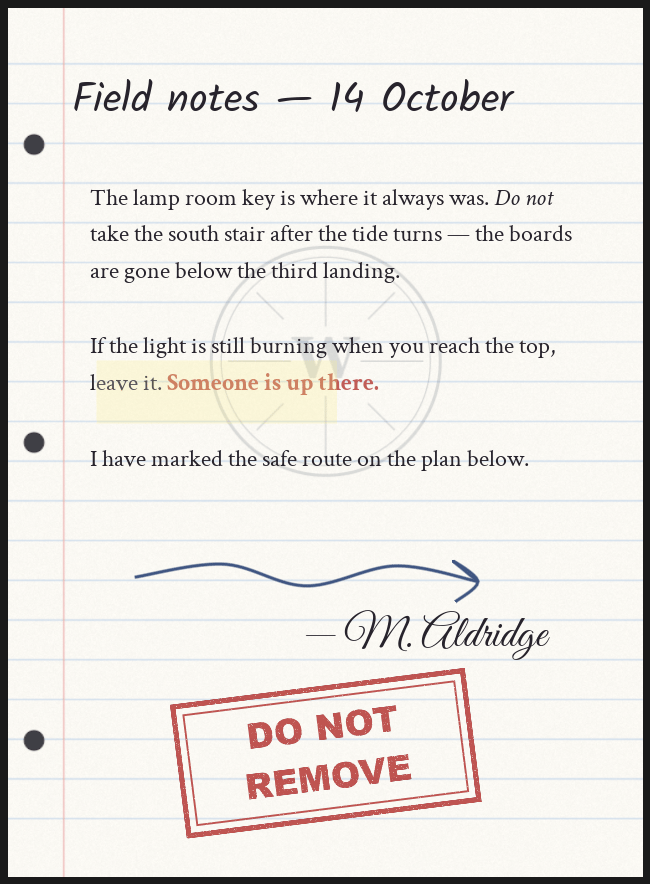
A finished page as it bakes at runtime.
UInkPageRenderLibrary
(category Inkwell → Page Content), plus a world subsystem,
UInkPageCacheSubsystem.
The pipeline
1
Compose the layer stack into a Slate widget tree
BuildInkWidget walks the page’s layers back to front and builds
one overlay slot per visible layer — text, image or drawing. It takes a Side:
a sheet’s front and its back are two independent layer stacks, composed and baked
separately.2
Allocate a transparent ink target
CreateInkTarget makes a linear-space render target at the page’s clamped size, with a
fully transparent clear color.3
Draw the widget into it, twice
RenderPageToTarget runs a gamma-free FWidgetRenderer over the tree. The result is
the ink layer: content over transparency, no paper anywhere in it.4
Feed the page material
A dynamic instance of the resolved page material receives the ink texture plus the
document’s paper and ink settings, and is assigned to a mesh slot (or handed to UMG as
a brush). Which material that is depends on the document’s Paper Mode — see
the page material.
Composing the widget tree
BuildInkWidget produces a box sized to the page’s clamped resolution, containing an
SOverlay with one slot per visible layer, in array order. Index 0 draws first (the
back of the page), the last entry draws last (the front). Nothing reorders or groups the
layers: where a Text layer sits in that stack is exactly what decides whether an image is a
watermark under the writing or a stamp over it.
Layers whose Visible flag is off are skipped entirely — by the bake and by the Page
Editor preview alike. Each layer’s Opacity is applied as Slate render opacity, so it
reaches text and drawn strokes, not only images.
Every position and size in a layer is normalized page space — (0,0) is the page’s
top-left, (1,1) its bottom-right — so changing the page resolution rescales a layout
instead of breaking it. Boxes are resolved against the clamped page size, the same size
the widget itself is built at, so a document scaled down for the bake keeps everything
where the author put it.
Each Text layer gets its own rich-text marshaller. They are never shared: a marshaller
carries the dirty flag its text block re-marshals on, and two blocks sharing one would let
the first to paint clear the flag out from under the second, leaving it blank.
The ink render target
CreateInkTarget produces a render target whose every property is load-bearing:
The widget renderer runs without gamma correction, matching the target: the page
material samples the ink with a LinearColor sampler, so the stored values must be linear.
RenderPageToTarget is game thread only, and returns false without baking when
rendering is impossible: the app cannot ever render, the null RHI is active, Slate is not
initialized, or the target is missing.
The bake deliberately draws the widget twice into the same target. Slate’s auto-wrap
computes its wrap width from the geometry cached by the previous paint, and an offscreen
widget has no previous paint — on a single draw, center- and right-justified text lays out
against a stale wrap width and lands shifted off the page. The first draw primes the
geometry cache, the second draws the correctly wrapped layout over it. Text layers with an
explicit box size wrap at a known width and sidestep the problem entirely, which is why
they are built that way.
The page material
Which material a page’s dynamic instance derives from is decided by the document’s Paper Mode (EInkPaperMode), resolved by ResolvePageBaseMaterial:
There is no hard-coded content path anywhere in the runtime.
M_PageInk is an opaque,
lit material: the composite goes into Base Color, so a page takes the scene’s lighting
like the physical object it is pretending to be. M_PageComposite_Preview is its unlit
twin, writing the same composite into Emissive; the Page Editor uses it so the authoring
preview matches the game exactly.
The MF_InkwellPageInk contract
/Inkwell/Materials/MF_InkwellPageInk is a material function and the public contract
shared by Custom Material and Mesh’s Own Material modes: drop it into any material
graph — wood desk, aged vellum, an animated hologram — and that material can receive
Inkwell’s ink.
- Input:
PaperColor— whatever your graph considers the paper. - Outputs:
InkedColor(your paper with the ink composited over it — wire it onward to Base Color or wherever your final color goes),RoughnessLerpAlpha,InkCoverage,BackFace,PageUVandBackUV(the face-mapped UVs, for sampling your own paper textures in register with the writing). - The ink side of what Inkwell drives at runtime — the ink render targets, the UV face mapping, the ink and paper tints, ink strength and the back-face gates — lives inside the function, and UE hoists a function’s parameters onto the calling material. Those nine names arrive on your material for free.
PaperTexture, UsePaperTexture,
BackPaperTexture, UseBackPaperTexture, BackPaperTint, HasDistinctBackPaper) are
declared by the stock material rather than the function. Declare them in your own material
only if you want Inkwell to drive your paper — see
Using your own page material.
The shipped M_PageInk and M_PageComposite_Preview are themselves built on the function,
so the stock materials keep the ink contract honest.
What gets written
When Inkwell applies a page it creates (or reuses) a dynamic instance and pushes these parameters. The parameter names are configurable in settings; the defaults are shown.
Two deliberate asymmetries:
- With no paper texture, Inkwell leaves the texture parameter alone — the material keeps its own default — and only flips the switch to 0, so the material falls back to its flat paper color instead of being handed something arbitrary.
- Under Custom Material (with a material actually assigned) and Mesh’s Own
Material, the paper parameters (
PaperTexture,UsePaperTexture) are not written at all. Those materials bring their own paper, and a customer graph that happens to use the same parameter names is never stomped.
A page with no Document assigned does not go through this path at all. The display
component instances the page material, puts the Blank Ink Texture from settings in the
ink slot and forces
UsePaperTexture to 0, so a bare sheet shows blank paper rather than
whatever ink was in that slot before.Two-sided pages and the back of the sheet
A page can carry an independently authored back (BackLayers — see
Layers). The back is a second, separate bake:
- An unauthored back costs nothing. The cache returns null for it before any allocation — no bake, no render target. Every document from before backs existed behaves exactly as it always did.
- An authored back bakes its own ink target at the same clamped size, cached under its own key (see the bake cache).
- The bundled sheet (
SM_PageSheet) is a thin slab withFront,BackandEdgematerial slots; its back face is U-mirrored. Inkwell dresses any mesh with a material slot namedBack: an authored back always wins and is applied there as a full page material of its own. With no authored back, the back shows the front’s ink as a mirrored show-through — like ink through thin paper — when the Page Face mapping’s Ink On Back Face is on (the default), or blank paper in the sheet’s stock when it is off. - A flat single-slot mesh (the old plane, most custom props) has one material for both
faces. An authored back still displays, through the
Back*material parameters andTwoSidedSignselection insideMF_InkwellPageInk, sampled U-mirrored so plane and slab display backs identically. On a one-sided material, back faces are culled and the whole path folds to zero. - The back’s paper can differ from the front’s: the document’s Back Paper is Same As Front by default, or its own texture, its own generated sheet, or its own Custom Material. See Paper.
Why it reads as ink, not a decal
Four decisions, all of them in the list above, add up to the effect:- The bake contains only content. There is no paper in the ink texture — the background is transparent, and the alpha is the coverage of the letterforms and strokes.
- The material composites, it does not replace. Ink is laid over the paper by its own alpha, so the paper’s grain, its ruling and its punched holes survive inside every stroke. White ink cannot brighten the sheet, because there is nothing to brighten with — uncovered pixels are paper.
- Ink Strength is a real dial. Dropping it below 1 lets more paper through every mark at once, which is exactly how faded pencil and worn print behave.
- The composite is base color on a lit material. The page shades with the room. An unlit overlay pasted on top would sit flat and bright wherever the paper went dark, and that is the single thing that most reads as a sticker.
The bake cache
Baking is not free, and many things in a level may show the same page — a stack and a display of the same journal, or five copies of the same note. In game and PIE worlds they all share bakes throughUInkPageCacheSubsystem, a world subsystem holding baked ink render targets.
- Key: document path + page index + the document’s Content Revision; a back bakes under the same key with a side marker, so front and back are separate entries.
- Scope: one cache per world, Game and PIE only. Editor worlds have no cache subsystem and bake on demand.
- Population: lazy. A page is baked the first time something asks for it, so a 40-page book costs nothing until it is read — and a back costs nothing until someone flips the sheet over.
What invalidates it
ContentRevision is a transient counter on the document. It is not an eviction
signal — it is part of the cache key, so bumping it means nothing will ever find the
old entries again.
Clear Page Cache (
ClearPageCache) drops this world’s cached bakes for one document,
fronts and backs alike. The subsystem’s own Clear Cache with no document drops
everything in the world. Neither re-bakes: call Refresh on the displaying component
afterwards.
Page size and what it costs
Page Size Pixels on the document is the bake resolution and the layout’s coordinate space. Every ink target and draw size in the pipeline derives fromGetClampedPageSize:
- Neither axis may exceed Max Page Bake Dimension (Project Settings, default 4096).
- The clamp is proportional — one scale factor on both axes — so the aspect ratio survives and a clamped bake still fills its target instead of cropping.
- The floor is 2 × 2 pixels.
- The Page Editor’s Size px boxes accept 128–4096 per axis in steps of 64, so in practice the default clamp only bites for documents built by script.
That is per page side actually baked, and cached bakes accumulate as the player reads.
A 20-page journal at the default size costs about 110 MB once it has been read cover to
cover — authored backs the player has flipped to add one target each on top. At
2048 × 2800 the same journal costs about 460 MB, which is the number that decides this
setting on console.
Picking Page Size Pixels
Do it before you author, not after. Positions and box sizes for images, text boxes and stroke points are normalized and survive a resize, but everything authored in absolute page pixels does not: Margins Px, Default Font Size (and the per-run sizes in the markup), each stroke’s Width Px, and the procedural paper’s Spacing / Thickness / Top margin / hole values. Double the page resolution after writing a page and the text keeps its pixel size while the page grows around it — the writing effectively shrinks.1
Choose the shape first
The aspect ratio of Page Size Pixels is the physical shape of the paper —
GetPageSizeCm() derives the height from it and Page Width Cm. A4 is 1 : 1.414
(1024 × 1448); US Letter is 1 : 1.294 (1024 × 1325); the default 1024 × 1400 sits
between them. Landscape pages, postcards and torn scraps are other ratios.2
Estimate the page's on-screen size at its closest
By default the Ink Page Reader holds a page at whatever distance
makes it cover View Fill Fraction (0.75) of the viewport’s height — so a held
page’s on-screen height is roughly three quarters of your vertical resolution
regardless of the page’s physical size: about 800 px tall at 1080p, 1600 px at 4K.
A raised View Fill Fraction, or a low fixed View Distance with the fit turned off,
raises the number.
3
Take the next size up, and stop
The default 1024 × 1400 already matches that reading view comfortably at 1080p. Go to
1536 or 2048 only when the page is genuinely larger on screen — a page read at 4K in a
full-screen UMG layout, a map the player zooms into, an edge-to-edge fill fraction.
Do not raise it “for quality” on a note read at arm’s length; see the mip warning
above.
4
Sanity-check the text size
Default Font Size is 28 page pixels, and the default line height multiplier is 1.18. On
the default 1024 × 1400 page that fits roughly 35 lines between the 90 px margins. If
you change the page resolution, scale Margins Px
and Default Font Size by the same factor to keep the page looking the way it did.
Generated paper resolution
When Paper Mode is Generated, the paper is rasterized by the paper generator rather than loaded from an asset. It is sized from the clamped page size — the same size the ink bakes at — on purpose: paper of a different size would be resampled against the ink, which is how a 2 px ruling turns into a soft gray band. The sheet is an uncompressed BGRA8 transient texture, sRGB, never streamed, with a mip chain box-filtered in linear space on the way out. The mips are why a ruled page a few meters away still reads as ruled paper instead of aliasing into noise, and the linear averaging is why the ruling does not darken as it shrinks. Caching is by hash of the settings plus the size, and the cache lives on the document, not on each display — so twenty pages of one journal share a single generated sheet, and so do twenty copies of the note placed around a level. A back with its own generated sheet gets a second cached texture, and dedupes against the front’s when the settings match. Change any procedural paper value and the hash changes, so the next request regenerates. Memory is about 1.33 × the flat size: roughly 7.6 MB for a 1024 × 1400 sheet, once per document.The UMG path skips the bake
The Ink Page widget (UInkPageWidget, shown in the palette as
Ink Page) does not bake to a render target. It builds the very same widget tree with
BuildInkWidget and puts it straight on screen inside a scale box, over a paper image, so
an on-screen page and an in-world page are built from identical code.
Consequences worth knowing:
- No render target is allocated and nothing is cached — the page rebuilds when the widget synchronizes, when you call Refresh, or when you turn a page.
- Show Paper draws the document’s resolved paper behind the writing, tinted by Paper Tint. With no paper texture it falls back to a flat sheet in that tint.
- Apply Ink Tint reproduces the material’s ink handling the only way Slate can: the document’s Ink Tint with its alpha multiplied by Ink Strength, applied to the whole ink subtree.
- The page keeps its authored aspect ratio inside whatever slot you give it.
- The widget shows fronts only — page backs are a held-sheet feature of the reader and the world materials.
Reading the diagnostics: LogInkwell
Everything Inkwell has to say about a misconfigured page goes to theLogInkwell
log category. When a page is blank, the wrong size, or missing its paper, filter the
Output Log by LogInkwell before changing anything. The warnings you may meet:
Mesh’s Own Material mode is the deliberate exception: a target material without
MF_InkwellPageInk shows no ink and logs nothing — that silence is the mode’s contract.
Editor preview
Outside of play, the display components preview pages in the level viewport through the same bake path, with different render-target bookkeeping because editor worlds have no cache:- Ink Page Display bakes into one reused transient render target per component, reallocated only when the clamped page size changes — plus a second one for the page’s back, allocated only once the page has an authored back.
- Ink Page Stack keeps one render target per sheet, so a fanned pile previews without churning allocations.
The sheet spawned by Procedural Paper gets query-only collision that blocks only the
Visibility channel — it deliberately does not intercept custom trace channels (AI sight,
hitscan weapons). If your own interaction system traces a custom channel at pages, set
that response on the spawned sheet yourself (Get Procedural Paper Mesh → Set Collision
Response To Channel), or trace Visibility.
A page is blank right after the editor starts
A page is blank right after the editor starts
A component can register before the editor’s Slate renderer is usable, so the first preview
bake fails — and because dynamic material instances never serialize, the sheet would keep
the level’s saved null material override and stay on the checkerboard forever.Inkwell retries on the core ticker, up to 8 attempts with exponential backoff (0.25 s
doubling to 32 s, about a minute in total), and resets the counter whenever a bake
succeeds. Normally the page pops in a moment after startup. If it keeps failing you get a
LogInkwell warning naming the actor and saying the sheet will refresh next time it is
edited or the map is reopened. Editing any property on the component forces a fresh
preview. Persistent failure means rendering is genuinely unavailable (null RHI) or the
page ink material cannot be loaded — check the Output Log for the settings warning.The bake API from Blueprint
Everything below is onUInkPageRenderLibrary, category Inkwell → Page Content. Full
signatures are in the Blueprint API reference.
Nodes that take a Side default it to Front.
C++ additionally gets the pieces the components are built from:
GetClampedPageSize,
BuildInkWidget, CreateInkTarget, RenderPageToTarget, ApplyPageMaterialParams,
ResolvePageBaseMaterial, ApplyBackOfSheet and GetPageBaseMaterial.
Next
Project Settings
The page material, the fifteen parameter names, and Max Page Bake Dimension.
Paper
The four paper modes from the authoring side, generated stock included.
Blueprint API
Every function on the render library and the cache subsystem.
FAQ
Blank pages, stretched text and missing paper, diagnosed.