> ## Documentation Index
> Fetch the complete documentation index at: https://docs.teriyakigaming.com/llms.txt
> Use this file to discover all available pages before exploring further.
# Introduction
> What Inkwell is: authored rich-text pages that render as real ink on real paper, in the world or on screen
A readable note in a game is usually one of two things: a texture painted on a quad, or a
UMG text block floating in front of the world. The first cannot be edited without going
back to a paint program; the second never looks like it is *on* the paper. Both read as a
decal — the writing sits on top of the sheet, white text brightens it, and the paper grain
stops dead at the edge of every glyph.
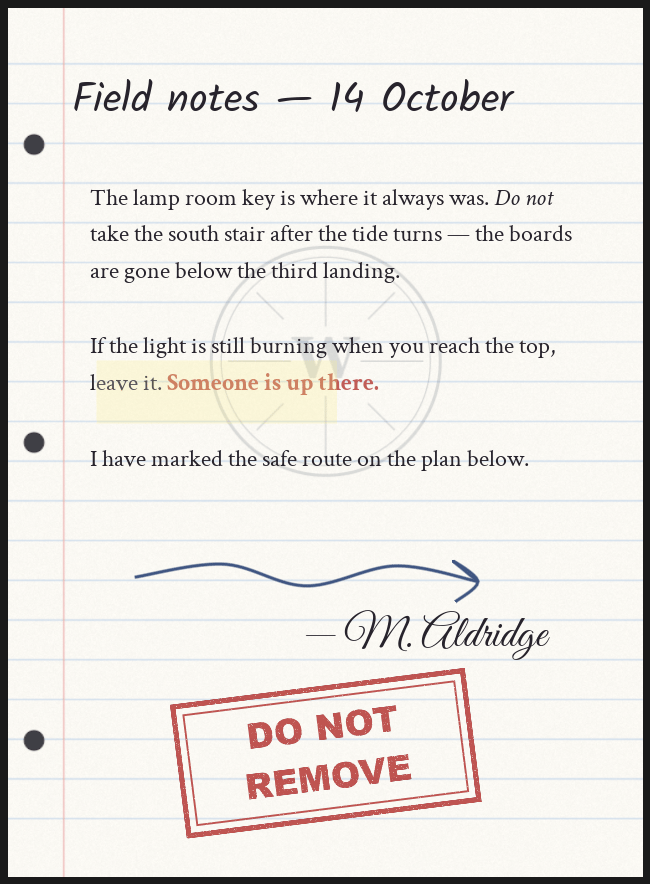
Inkwell removes that gap. You write pages in a WYSIWYG editor inside Unreal, and at
runtime each page is laid out with Slate — per-run fonts, sizes, colors, bold / italic /
underline / strikethrough — and baked into an **ink layer**: a transparent render target
holding the content and nothing else. The page material then *multiplies* that ink over
the paper. Grain shows through every stroke, white ink cannot lighten the sheet, and one
document can be printed onto different papers, tinted, or faded without re-baking the ink:
the paper, **Paper Tint**, **Ink Tint** and **Ink Strength** are parameters on the page
material, not part of the bake.
 ## Two minutes to see it
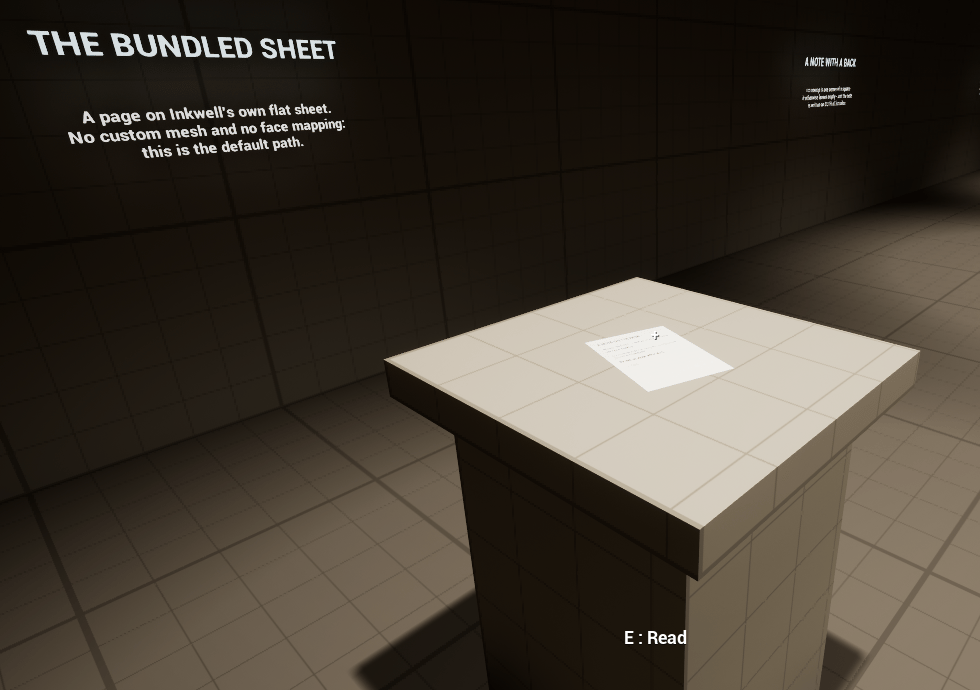
The plugin ships a playable showroom: enable Inkwell, turn on **Show Plugin Content** in
the Content Browser, open **`/Inkwell/Maps/L_InkwellShowroom`**, and press Play. A
first-person reader pawn spawns with everything already bound — walk up to any exhibit,
press **E** to pick it up, turn pages with the arrow keys or mouse wheel, flip the sheet
over with **F**, put it back with **Q**. The map needs nothing from your project, not even
input assets. The [quickstart](/plugins/inkwell/quickstart) starts there.
## Two minutes to see it
The plugin ships a playable showroom: enable Inkwell, turn on **Show Plugin Content** in
the Content Browser, open **`/Inkwell/Maps/L_InkwellShowroom`**, and press Play. A
first-person reader pawn spawns with everything already bound — walk up to any exhibit,
press **E** to pick it up, turn pages with the arrow keys or mouse wheel, flip the sheet
over with **F**, put it back with **Q**. The map needs nothing from your project, not even
input assets. The [quickstart](/plugins/inkwell/quickstart) starts there.
 ## What you get
**[A real page editor](/plugins/inkwell/authoring/page-editor).** Type straight onto the paper. Select a word, change its font, size
or color, hit **B** / **I** / **U**. The right-hand preview renders through the exact same
bake path the game uses, so what you see is the pixels that ship.
**[Layers](/plugins/inkwell/authoring/layers).** A page is an ordered back-to-front stack of layers — `Text`, `Image` or
`Drawing`. Index 0 is the back of the page, the last entry the front, so a watermark can
sit under the writing while a stamp sits over it. Text is a layer payload, which means one
page can carry a heading, a body and a signature as three independent text boxes with
pictures stacked between them.
**[Drawing](/plugins/inkwell/authoring/drawing).** Five brushes — pen, pencil, marker, crayon and highlighter — drawn
procedurally, with color, size and opacity, plus an eraser that rubs out the ink under the
cursor instead of deleting whole strokes. No brush textures ship with the plugin, and none
are needed.
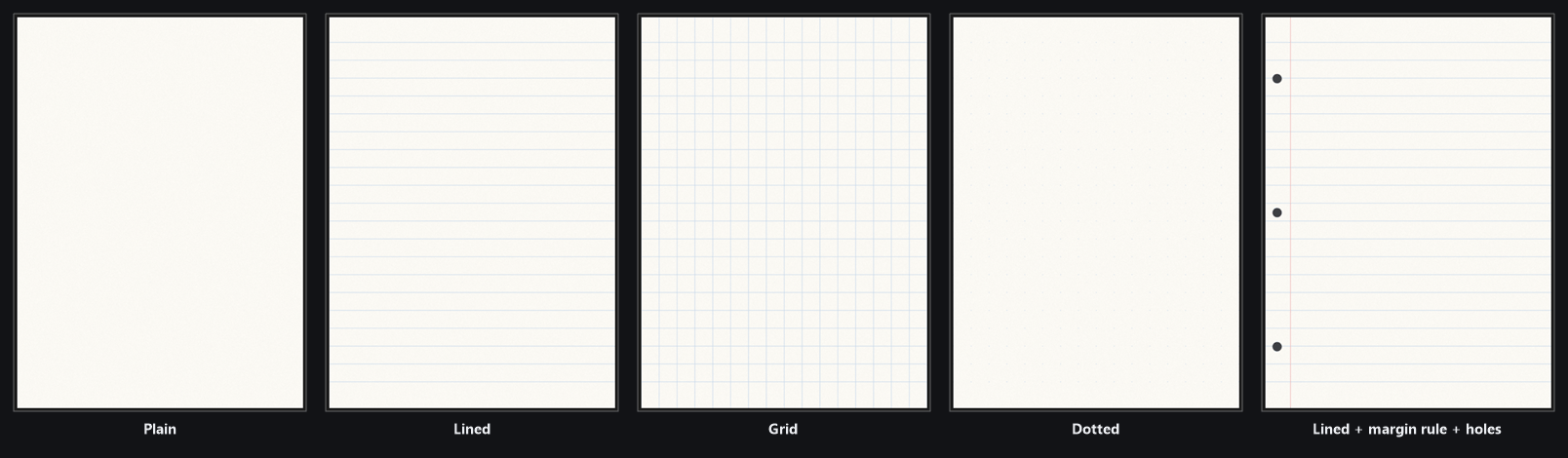
**[Four kinds of paper](/plugins/inkwell/authoring/paper).** A document's paper can be a texture you supply, paper Inkwell
generates itself — plain, lined, grid or dotted stock with your own colors, spacing, an
optional margin rule, punched binder holes and fiber grain — a whole material of your own
carrying the `MF_InkwellPageInk` material function, or no paper from Inkwell at all: the
ink is laid onto whatever material the target mesh already wears. A project can ship
notebook paper, graph paper and inked wooden signs without a single paper texture.
## What you get
**[A real page editor](/plugins/inkwell/authoring/page-editor).** Type straight onto the paper. Select a word, change its font, size
or color, hit **B** / **I** / **U**. The right-hand preview renders through the exact same
bake path the game uses, so what you see is the pixels that ship.
**[Layers](/plugins/inkwell/authoring/layers).** A page is an ordered back-to-front stack of layers — `Text`, `Image` or
`Drawing`. Index 0 is the back of the page, the last entry the front, so a watermark can
sit under the writing while a stamp sits over it. Text is a layer payload, which means one
page can carry a heading, a body and a signature as three independent text boxes with
pictures stacked between them.
**[Drawing](/plugins/inkwell/authoring/drawing).** Five brushes — pen, pencil, marker, crayon and highlighter — drawn
procedurally, with color, size and opacity, plus an eraser that rubs out the ink under the
cursor instead of deleting whole strokes. No brush textures ship with the plugin, and none
are needed.
**[Four kinds of paper](/plugins/inkwell/authoring/paper).** A document's paper can be a texture you supply, paper Inkwell
generates itself — plain, lined, grid or dotted stock with your own colors, spacing, an
optional margin rule, punched binder holes and fiber grain — a whole material of your own
carrying the `MF_InkwellPageInk` material function, or no paper from Inkwell at all: the
ink is laid onto whatever material the target mesh already wears. A project can ship
notebook paper, graph paper and inked wooden signs without a single paper texture.
 **Pages have backs.** Every sheet can carry an independently authored back — its own
layers, and its own paper if you want a lined front over a plain back. The reader turns
the sheet over with **Flip Page**, and on a multipage document reads in book order: front,
back, next page. Backs are opt-in; a page you never author a back for costs nothing.
**One physical dimension.** A document's **Page Width Cm** is the only real-world size you
set — 21 cm, the width of A4, out of the box. The height is derived from the page's pixel
aspect ratio, so the paper is always the shape of the page you authored and the writing can
never come out stretched. Author a landscape page and you get landscape paper. Every
surface in the plugin sizes itself from that one number.
**Nothing to build first.** Assign a document to an Ink Page Display component and, if the
actor has no mesh of its own, the component makes and sizes its own sheet.
## The pieces
These are the production components — the parts your game ships:
| Component / asset | What it does |
| --------------------------------------------------------------------------------------------- | ----------------------------------------------------------------------------------------------------------------------------------------------------------------------------------------------------- |
| [**Ink Page Document**](/plugins/inkwell/authoring/documents) (`UInkPageDocument`) | The content: pages of layers, paper settings, default text style. Created from the Content Browser, edited in the Page Editor. |
| [**Ink Page Display**](/plugins/inkwell/components/page-display) (`UInkPageDisplayComponent`) | Puts a document on a mesh — or on a sheet it spawns itself. Add it to any actor, assign a Document, done. **Next Page**, **Previous Page**, **Set Page Index**, **On Page Changed**. |
| [**Ink Page Stack**](/plugins/inkwell/components/page-stack) (`UInkPageStackComponent`) | A drop-in replacement for Ink Page Display that draws the document as a physical pile of paper, one sheet mesh per page, current page on top. |
| [**Ink Page**](/plugins/inkwell/components/page-actor) (`AInkPageActor`) | A placeable sheet of paper. Drag it in, pick a document, done. |
| [**Ink Page**](/plugins/inkwell/components/page-widget) (`UInkPageWidget`) | The same page in UMG, for reading on screen instead of in the world. |
| [**Ink Page Reader**](/plugins/inkwell/components/reader) (`UInkPageReaderComponent`) | Goes on your pawn or controller. Floats a page up in front of the camera, turns and flips it, and puts it back exactly where it lay. No input handling of its own — your interaction system calls it. |
The plugin also bundles a set of **demo and reference pieces** so the showroom plays out
of the box and so you can read a complete working integration: the
[**Ink Page Interactor**](/plugins/inkwell/components/interactor) (`UInkPageInteractorComponent`, the
"look at a page, press E" component), the **Inkwell Reader Character**
(`AInkwellReaderCharacter`), the **Inkwell Reader Game Mode**
(`AInkwellReaderGameMode`), the **Inkwell Exhibit** component
(`UInkwellExhibitComponent`) and the read prompt widget (`WBP_InkwellReadPrompt`). They
are reference implementations, not recommended for production use — in your game, your own
interaction system drives an Ink Page Reader directly. The
[integration guide](/plugins/inkwell/guides/integration) shows exactly that.
## No strings attached
The runtime module depends on engine modules only — `Core`, `CoreUObject`, `Engine`,
`InputCore`, `EnhancedInput`, `Slate`, `SlateCore`, `UMG`, `DeveloperSettings`, plus
private `RenderCore` and `RHI`. The one plugin dependency is Enhanced Input, which ships
with the engine and is enabled in every UE5 project by default. No third-party libraries,
nothing else pulled into your project. Everything is Blueprint-callable, so a
Blueprint-only project can use all of it.
Five open-licensed font families ship in `/Inkwell/Fonts/` — Courier Prime, Crimson Text,
Great Vibes, Kalam and Patrick Hand — imported as composite fonts and ready to use. Bring
your own with [font import](/plugins/inkwell/authoring/fonts).
Every asset Inkwell loads resolves through **Project Settings → Plugins → Inkwell**, so a
project can repoint the ink material, the sheet mesh, the paper texture or the default font
without touching code.
## Next
See the showroom working in two minutes, author a page, and wire reading into your own
interaction system.
Keep your interactor and your base interactable Blueprint. Drive an Ink Page Display
and an Ink Page Reader from what you already have.
Install from Fab, enable the plugin per project, check it took, and set the settings
that matter on day one.
The Page Editor end to end: the toolbar, the three modes, layers, and the game-true
preview.
**Pages have backs.** Every sheet can carry an independently authored back — its own
layers, and its own paper if you want a lined front over a plain back. The reader turns
the sheet over with **Flip Page**, and on a multipage document reads in book order: front,
back, next page. Backs are opt-in; a page you never author a back for costs nothing.
**One physical dimension.** A document's **Page Width Cm** is the only real-world size you
set — 21 cm, the width of A4, out of the box. The height is derived from the page's pixel
aspect ratio, so the paper is always the shape of the page you authored and the writing can
never come out stretched. Author a landscape page and you get landscape paper. Every
surface in the plugin sizes itself from that one number.
**Nothing to build first.** Assign a document to an Ink Page Display component and, if the
actor has no mesh of its own, the component makes and sizes its own sheet.
## The pieces
These are the production components — the parts your game ships:
| Component / asset | What it does |
| --------------------------------------------------------------------------------------------- | ----------------------------------------------------------------------------------------------------------------------------------------------------------------------------------------------------- |
| [**Ink Page Document**](/plugins/inkwell/authoring/documents) (`UInkPageDocument`) | The content: pages of layers, paper settings, default text style. Created from the Content Browser, edited in the Page Editor. |
| [**Ink Page Display**](/plugins/inkwell/components/page-display) (`UInkPageDisplayComponent`) | Puts a document on a mesh — or on a sheet it spawns itself. Add it to any actor, assign a Document, done. **Next Page**, **Previous Page**, **Set Page Index**, **On Page Changed**. |
| [**Ink Page Stack**](/plugins/inkwell/components/page-stack) (`UInkPageStackComponent`) | A drop-in replacement for Ink Page Display that draws the document as a physical pile of paper, one sheet mesh per page, current page on top. |
| [**Ink Page**](/plugins/inkwell/components/page-actor) (`AInkPageActor`) | A placeable sheet of paper. Drag it in, pick a document, done. |
| [**Ink Page**](/plugins/inkwell/components/page-widget) (`UInkPageWidget`) | The same page in UMG, for reading on screen instead of in the world. |
| [**Ink Page Reader**](/plugins/inkwell/components/reader) (`UInkPageReaderComponent`) | Goes on your pawn or controller. Floats a page up in front of the camera, turns and flips it, and puts it back exactly where it lay. No input handling of its own — your interaction system calls it. |
The plugin also bundles a set of **demo and reference pieces** so the showroom plays out
of the box and so you can read a complete working integration: the
[**Ink Page Interactor**](/plugins/inkwell/components/interactor) (`UInkPageInteractorComponent`, the
"look at a page, press E" component), the **Inkwell Reader Character**
(`AInkwellReaderCharacter`), the **Inkwell Reader Game Mode**
(`AInkwellReaderGameMode`), the **Inkwell Exhibit** component
(`UInkwellExhibitComponent`) and the read prompt widget (`WBP_InkwellReadPrompt`). They
are reference implementations, not recommended for production use — in your game, your own
interaction system drives an Ink Page Reader directly. The
[integration guide](/plugins/inkwell/guides/integration) shows exactly that.
## No strings attached
The runtime module depends on engine modules only — `Core`, `CoreUObject`, `Engine`,
`InputCore`, `EnhancedInput`, `Slate`, `SlateCore`, `UMG`, `DeveloperSettings`, plus
private `RenderCore` and `RHI`. The one plugin dependency is Enhanced Input, which ships
with the engine and is enabled in every UE5 project by default. No third-party libraries,
nothing else pulled into your project. Everything is Blueprint-callable, so a
Blueprint-only project can use all of it.
Five open-licensed font families ship in `/Inkwell/Fonts/` — Courier Prime, Crimson Text,
Great Vibes, Kalam and Patrick Hand — imported as composite fonts and ready to use. Bring
your own with [font import](/plugins/inkwell/authoring/fonts).
Every asset Inkwell loads resolves through **Project Settings → Plugins → Inkwell**, so a
project can repoint the ink material, the sheet mesh, the paper texture or the default font
without touching code.
## Next
See the showroom working in two minutes, author a page, and wire reading into your own
interaction system.
Keep your interactor and your base interactable Blueprint. Drive an Ink Page Display
and an Ink Page Reader from what you already have.
Install from Fab, enable the plugin per project, check it took, and set the settings
that matter on day one.
The Page Editor end to end: the toolbar, the three modes, layers, and the game-true
preview.