> ## Documentation Index
> Fetch the complete documentation index at: https://docs.teriyakigaming.com/llms.txt
> Use this file to discover all available pages before exploring further.
# Ink Page Stack
> Show a multi-page document as a physical pile of paper: one sheet per page, with a choice of page-turn styles from an instant snap to a sheet arcing around the pile.
**Ink Page Stack** (`UInkPageStackComponent`) shows an
[Ink Page Document](/plugins/inkwell/authoring/documents) as a physical stack of paper. It spawns one sheet
mesh per page, puts the current page on top and squares the rest up underneath in reading
order. Turning a page sends the top sheet to the bottom and eases the rest up one place —
**Page Turn Style** says how that move looks — so a multipage journal reads like paper
rather than a texture swap.
It extends [Ink Page Display](/plugins/inkwell/components/page-display) and is a drop-in replacement for it:
put it on an actor, assign a document, done. The whole page API — **Next Page** /
**Previous Page** / **Set Page Index** / **On Page Changed** — works unchanged, and the
[Ink Page Reader](/plugins/inkwell/components/reader) (and the demo
[Ink Page Interactor](/plugins/inkwell/components/interactor)) treat it exactly like a single page. The
inherited properties that do not apply to a pile are called out [below](#properties).
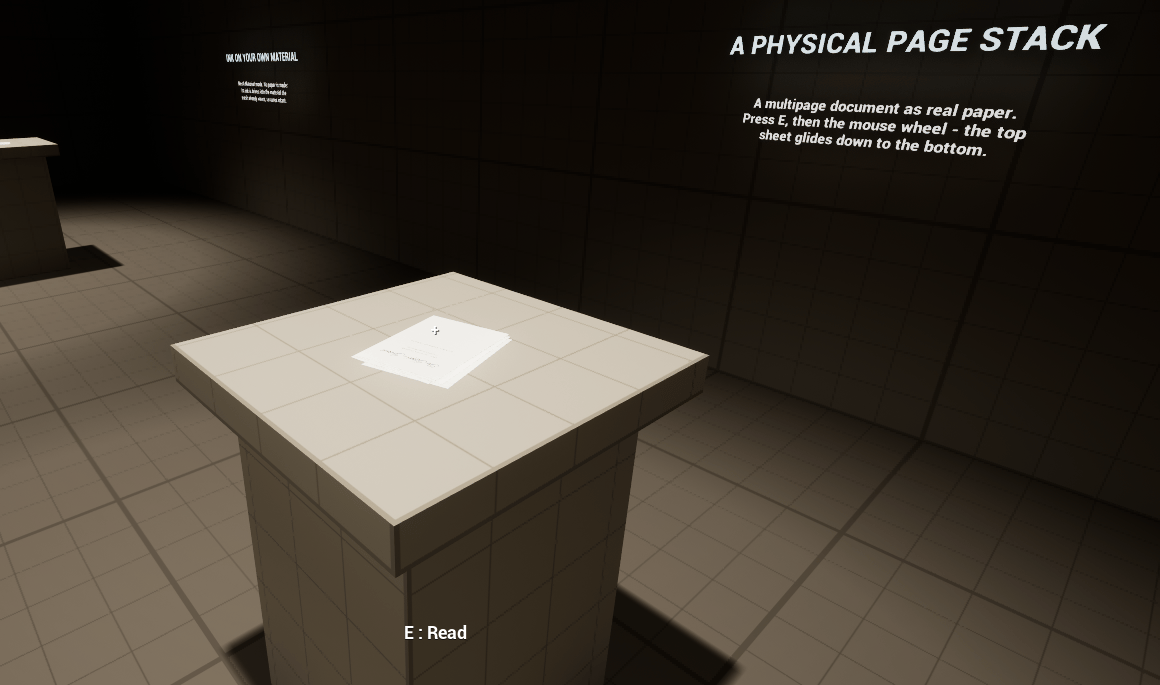 There is a working example at `/Inkwell/Examples/Blueprints/BP_InkwellJournalStack`, wired
to the sample journal document `/Inkwell/Examples/PD_InkwellJournal` — it is one of the
podium exhibits in the showroom map `/Inkwell/Maps/L_InkwellShowroom`. Enable **Show
Plugin Content** in the Content Browser to see them, and read the
[examples tour](/plugins/inkwell/guides/examples).
## What a physical stack actually is
The pile is **derived state**, rebuilt from the document rather than saved. Concretely:
* One `StaticMeshComponent` per visible page is created at runtime — and for the editor
preview — attached to the **actor's root component** and marked transient. The pile is
therefore laid out in the root's local space: it stacks along the root's local Z, so place
the actor with its Z pointing up out of the table.
* Sheet count is the page count, capped at **Max Visible Sheets**. With no document, no root
component, or no pages, there are **no sheets at all** — unlike the base component, a stack
with no document shows nothing rather than a blank sheet.
* Every sheet is scaled from the 100 cm sheet mesh to the real paper size:
[**Get Effective Page Size Cm**](/plugins/inkwell/components/page-display#sizing), which is the document's
own size × the inherited **Page Scale**. There is no separate sheet size to disagree with
the pages.
* Each sheet is two-sided paper. A page with no authored back shows the front's ink
mirrored through on the underside, the way thin paper does; a page with an authored back
(see [two-sided pages](/plugins/inkwell/authoring/documents)) shows that back's own bake instead. Either
way the pile looks right from below and at an angle.
* The sheets are **not obstacles**. See [collision](#collision-focus-targets-not-obstacles).
Do not attach anything to individual sheets or store references to them. They are created,
destroyed and re-baked as you turn pages, and they are never saved into the level. Read them
through **Get Sheets** at the moment you need them.
## Properties
Everything from [Ink Page Display](/plugins/inkwell/components/page-display#properties) is inherited and
behaves the same — **Document**, **Page Index**, **Page Scale**, **Apply On Begin Play**,
**Loop Pages**, **Can Be Picked Up**, **Preview In Editor**. On top of those, under
**Inkwell → Stack**:
| Property | Type | Default | What it does |
| ----------------------- | ----------------- | ------------ | --------------------------------------------------------------------------------------------------------------------------------------------------------------------------------------------------------- |
| **Sheet Gap** | Float | `0.35` | Vertical gap between sheets in the pile, in centimeters. The top sheet sits highest. |
| **Fan Splay** | Float | `0.35` | How far each deeper sheet slides sideways, in centimeters, alternating left/right and growing with depth. The default is small on purpose: a pile someone tidied, not a fan. Turn it up for a messy desk. |
| **Fan Angle** | Float | `0.8` | How far each deeper sheet twists, in degrees, alternating direction and growing with depth. |
| **Stack Yaw** | Float | `0.0` | Spins the whole pile about its own normal, in degrees, so the writing reads upright for your actor. |
| **Stack Offset** | Vector | `(0, 0, 0)` | Where the pile sits relative to the actor's root component. |
| **Flip Interp Speed** | Float | `8.0` | The speed-based ease sheets use to reach their slots. Under **Glide** that includes the sheet being turned; under **Arc** it only moves the sheets shuffling up behind the flying one. |
| **Page Turn Style** | Enum | `Glide` | What a page turn looks like: **Glide**, **Arc** or **Snap**. See [Page turns](#page-turns). |
| **Page Turn Duration** | Float | `0.45` | Seconds one Arc turn takes, from lifting off the pile to settling back onto it. Editable only with **Page Turn Style** set to Arc. |
| **Page Turn Lift Cm** | Float | `4.0` | How far above the top of the pile the Arc-turned sheet rises at the peak of its flight, in centimeters. Editable only with **Page Turn Style** set to Arc. |
| **Max Visible Sheets** | Integer | `16` | Upper bound on how many sheet meshes exist at once, clamped 1–64. Longer documents use a [sliding window](#long-documents-the-sliding-window). |
| **Sheet Mesh** | Static Mesh | *None* | Overrides the sheet mesh. Unset uses the project's page sheet mesh from [Project Settings](/plugins/inkwell/reference/settings). Needs clean 0–1 UVs across the page face. |
| **Sheets Block Traces** | Boolean | `true` | Give sheets query collision so a line trace can focus the pile. Off means no collision whatsoever. |
| **Sheet Trace Channel** | Collision Channel | `Visibility` | The one channel the sheets respond to. Every other channel is ignored. Match it to your interaction trace's channel. |
The inherited **Procedural Paper** toggle is grayed out here: a stack always spawns its own
sheets, so the base component's single fallback sheet never applies. The inherited
**Target Mesh**, **Page Face** and **Material Slot** are not used by the pile either — each
sheet is its own target, single-material, with the page always drawn into slot 0.
### How the pile is shaped
Each deeper sheet is offset from the one above it: down by **Sheet Gap**, sideways by
**Fan Splay**, and twisted by **Fan Angle**. Splay and twist **alternate direction** per
sheet and grow in magnitude with depth, which is what stops a splayed pile from leaning off
to one side while still letting deeper sheets peek out further. The top sheet has no splay
and no twist — only **Stack Yaw**, which rotates the pile as a whole.
**Stack Offset** places the pile relative to the actor's root, so the actor's origin can stay
where it is useful (the desk surface, the pivot of a prop) while the paper sits somewhere
else.
Swapping in a different document re-deals the pile at that document's dimensions, live in the
viewport, and dragging **Page Scale** re-deals it larger or smaller as you drag — without
re-baking a single page.
## Page turns
In play, **Next Page** / **Previous Page** / **Set Page Index** do not swap a texture. The
pile is re-dealt and the sheets move to their new slots, in the manner **Page Turn Style**
picks:
* **Glide** (the default) — every sheet, the turned one included, eases straight to its new
place at **Flip Interp Speed**: the pile settles the way a hand squaring it up would
leave it. The sheet on its way to the bottom passes through the ones above it, which at a
tidy sheet gap reads as it sinking into the pile rather than as a defect.
* **Arc** — deliberately theatrical. The sheets shuffling one place up or down still ease
at **Flip Interp Speed**, but the sheet traveling from one end of the pile to the other
flies instead: it swings clear of the pile's footprint, rises to **Page Turn Lift Cm**
above the top of the pile at the apex, tips over as it goes, and comes down onto its new
slot — never slicing through the sheets in between. The clearance swing is computed from
the paper itself (a full page width plus the pile's total splay). The flight runs on a
clock — **Page Turn Duration** seconds — not on an interpolation speed, so each stage
happens in order.
* **Snap** — no motion at all: every sheet is in its new place the instant the page
changes. The cheap presentation.
Turn the page again mid-flight under Arc and the airborne sheet keeps its progress and
re-aims rather than dropping out of the air, so fast page-flipping stays smooth. Switching
**Page Turn Style** away from Arc while a sheet is airborne makes it give up the arc and
glide home from wherever it is.
The component **only ticks while sheets are moving**. Once everything has settled into its
slot, ticking switches itself off.
In the editor viewport, property edits always snap — dragging **Fan Splay** or
**Sheet Gap** reshapes the pile instantly instead of gliding under the slider. In play, only
a structural rebuild (a new document, a change in sheet count) snaps; ordinary page turns
animate in the chosen style.
## Long documents: the sliding window
At most **Max Visible Sheets** sheet meshes ever exist. A document with more pages than that
shows a **sliding window** of consecutive pages around the current page, and re-bakes sheets at
the window's edge as you read. A 200-page document costs no more meshes than a 16-page one, and
the pile always looks right from the top.
* The window is a block of consecutive pages, positioned so the current page is inside it and
never wrapping past either end of the document.
* Each page keeps the same sheet across page turns, so only sheets at the window's edge ever
take on a new page.
* **A moving sheet is never re-inked.** When the window slides, the new page is deferred until
the sheet has settled at the bottom of the pile — otherwise you would watch the ink change on
a sheet in mid-motion. (Under **Snap** there is no motion to protect, so bakes apply
immediately.)
* Editing the document at runtime bumps its content revision, which marks every sheet stale;
they all re-bake on the next **Refresh**.
## Collision: focus targets, not obstacles
Sheets exist for one purpose beyond being seen: answering the line trace that lets an
interaction system focus the pile. Each sheet is set up as:
* Collision enabled: **Query Only** — no physics collision at all. (Or **No Collision** when
**Sheets Block Traces** is off.)
* Object type: **World Dynamic**.
* Responses: **ignore every channel**, then **block exactly one** — **Sheet Trace Channel**.
* Overlap events off, and never affects the navmesh.
Pawn movement sweeps, physics impulses and camera probes all pass straight through the pile,
while a trace on the right channel still hits it. These settings are re-applied whenever the
pile is refreshed, so changing **Sheet Trace Channel** or **Sheets Block Traces** takes effect
without rebuilding anything.
If your interaction system traces on a custom channel, set **Sheet Trace Channel** to that same
channel. The sheets answer that one channel and nothing else, so a mismatch means the pile is
never focusable — the trace passes through it as if it were not there, with no warning
anywhere. The demo interactor's **Trace Channel** has the same default (**Visibility**), so
out of the box the pair agree.
## API
Everything from [Ink Page Display](/plugins/inkwell/components/page-display#functions) works unchanged. The
stack adds one node:
| Node | Returns | What it does |
| -------------- | ------------------------------- | -------------------------------------------------------------- |
| **Get Sheets** | Array of Static Mesh Components | The sheet meshes currently in the pile, top of the pile first. |
Three inherited functions are stack-aware:
* **Resolve Target Mesh** returns the **top sheet** — the one showing the current page. With no
sheets (no document assigned) it falls back to the base component's rule.
* **Refresh** rebuilds the pile: sheet count, mesh and collision, page assignment, layout, and
any stale bakes.
* **Apply Page Size** re-deals the pile at the current sheet size and nothing else. Every sheet
already carries the right page, so only transforms are rewritten. This is the cheap path a
**Page Scale** change takes.
## Build a readable journal on a table
Create an Ink Page Document, add the pages, and save with **Save Document**. See
[documents](/plugins/inkwell/authoring/documents) and the [Page Editor](/plugins/inkwell/authoring/page-editor). The
document's **Page Width Cm** decides how big the paper is, so set it to something
journal-sized (14–16 cm) rather than A4.
Create an empty Actor Blueprint — journal, not table. Add a **Scene** component as the root
if it has none, then **Add Component → Ink Page Stack**, and assign your **Document**.
Keep the stack on its own actor. The [Ink Page Reader](/plugins/inkwell/components/reader) floats the
**whole actor** up to the camera when the player reads it, so a stack parented to the table
actor would take the table with it.
Drag the actor into the level and sit it on the table, with the actor's Z pointing up. The
pile appears in the viewport immediately — **Preview In Editor** is on by default.
Rotate the actor so the paper faces the right way, then use **Stack Yaw** to spin the pile
in its own plane until the writing reads upright from where the player will stand.
**Stack Offset** nudges the pile off the actor's origin if you want the origin somewhere
else.
Scrub **Page Index** to confirm the sheets reorder. Then set the look: **Sheet Gap** for how
thick the pile reads, **Fan Splay** and **Fan Angle** for how tidy it is (defaults are a
neat pile; `2` and `4` give a rummaged desk), **Page Turn Style** for how a turn moves —
try **Arc** for the theatrical flight. Cap **Max Visible Sheets** lower if the document is
long and the pile only needs to look deep, not complete.
Add an **Ink Page Reader** to your player pawn and, from your own interact input, call
**Begin Reading Actor** with the actor your trace hit — the stack is an Ink Page Display,
so the pile focuses and reads like any other page. Route your page-turn input to the
reader's **Next Page** / **Previous Page**. If your trace runs on a custom channel, set
the stack's **Sheet Trace Channel** to match it. The full recipe is in the
[integration guide](/plugins/inkwell/guides/integration).
For a quick test without wiring anything, add the demo
[Ink Page Interactor](/plugins/inkwell/components/interactor) to the pawn instead — it finds or creates
a reader and binds working keys. It is a demo/reference component, not meant to ship;
check that its **Trace Channel** matches the stack's **Sheet Trace Channel** (both are
**Visibility** out of the box).
Walk up, look at the pile and press your interact key (**E** with the demo interactor):
the journal floats up to the camera. Turn pages (**Right/Left arrow** or **mouse wheel**
with the demo keys) and watch the sheets move in your chosen style. Put it back
(**Q** with the demo keys) and it settles exactly where it was lying.
Nothing focusable? Your trace channel and **Sheet Trace Channel** disagree — or, with the
demo interactor, turn on its **Draw Debug Trace**: the line is green when it hits a
readable page and red when it does not.
## Working with the reader
The [Ink Page Reader](/plugins/inkwell/components/reader) does the reading. Things worth knowing when the
page being read is a stack:
* **The reader moves the actor, not the sheet.** The whole pile floats up together, keeps its
shape, and blends back to exactly where it was lying. This is why the stack wants an actor of
its own.
* **Collision is disabled on the actor while it is being read**, so a pile at the player's face
cannot be traced or bumped, and restored when the page is put down.
* **Page turns still animate while reading.** The reader's **Next Page** / **Previous Page**
call straight through to the stack, so the sheets move right in front of the camera — and on
documents with authored backs the reader reads in
[book order](/plugins/inkwell/components/reader#book-order), front before back before the next page.
* **Fit to view works from the paper size.** The reader frames the document's printed size —
the same **Get Effective Page Size Cm** the sheets are scaled by — so a journal-sized pile is
held closer than a poster automatically.
* **Reading Rotation Offset** on the reader is tuned for the Inkwell page sheet — a flat plane
whose printed face points up. Stack sheets use that same mesh by default, so the default is
right. If you set a custom **Sheet Mesh** with a different orientation, that is the property
to adjust.
* Physics-simulating components on the page actor are switched off for the ride and restored
afterwards, so a pile you can knock about still reads correctly.
## Editor preview
The stack previews in the level viewport like the base component: assign a document and
the pile appears, scrub **Page Index** and the sheets reorder, drag the layout properties and
the pile reshapes instantly. The preview bakes into a render target per sheet, never dirties the
level package, and uses the same startup-retry behavior described under
[Ink Page Display](/plugins/inkwell/components/page-display#editor-preview). One preview shortcut: in the editor
viewport the underside of every sheet shows the front's ink mirrored through, even on pages with
an authored back — press Play to see the authored back on the pile. In play, sheet bakes go
through the per-world page cache, so several stacks showing the same document page share one
bake.
## Next
The base component: properties, page API and events the stack inherits.
Floating the pile up to the player's eyes, and putting it back.
Wiring the pile into the interaction system your project already has.
BP\_InkwellJournalStack, the showroom, and the rest of the shipped example content.
There is a working example at `/Inkwell/Examples/Blueprints/BP_InkwellJournalStack`, wired
to the sample journal document `/Inkwell/Examples/PD_InkwellJournal` — it is one of the
podium exhibits in the showroom map `/Inkwell/Maps/L_InkwellShowroom`. Enable **Show
Plugin Content** in the Content Browser to see them, and read the
[examples tour](/plugins/inkwell/guides/examples).
## What a physical stack actually is
The pile is **derived state**, rebuilt from the document rather than saved. Concretely:
* One `StaticMeshComponent` per visible page is created at runtime — and for the editor
preview — attached to the **actor's root component** and marked transient. The pile is
therefore laid out in the root's local space: it stacks along the root's local Z, so place
the actor with its Z pointing up out of the table.
* Sheet count is the page count, capped at **Max Visible Sheets**. With no document, no root
component, or no pages, there are **no sheets at all** — unlike the base component, a stack
with no document shows nothing rather than a blank sheet.
* Every sheet is scaled from the 100 cm sheet mesh to the real paper size:
[**Get Effective Page Size Cm**](/plugins/inkwell/components/page-display#sizing), which is the document's
own size × the inherited **Page Scale**. There is no separate sheet size to disagree with
the pages.
* Each sheet is two-sided paper. A page with no authored back shows the front's ink
mirrored through on the underside, the way thin paper does; a page with an authored back
(see [two-sided pages](/plugins/inkwell/authoring/documents)) shows that back's own bake instead. Either
way the pile looks right from below and at an angle.
* The sheets are **not obstacles**. See [collision](#collision-focus-targets-not-obstacles).
Do not attach anything to individual sheets or store references to them. They are created,
destroyed and re-baked as you turn pages, and they are never saved into the level. Read them
through **Get Sheets** at the moment you need them.
## Properties
Everything from [Ink Page Display](/plugins/inkwell/components/page-display#properties) is inherited and
behaves the same — **Document**, **Page Index**, **Page Scale**, **Apply On Begin Play**,
**Loop Pages**, **Can Be Picked Up**, **Preview In Editor**. On top of those, under
**Inkwell → Stack**:
| Property | Type | Default | What it does |
| ----------------------- | ----------------- | ------------ | --------------------------------------------------------------------------------------------------------------------------------------------------------------------------------------------------------- |
| **Sheet Gap** | Float | `0.35` | Vertical gap between sheets in the pile, in centimeters. The top sheet sits highest. |
| **Fan Splay** | Float | `0.35` | How far each deeper sheet slides sideways, in centimeters, alternating left/right and growing with depth. The default is small on purpose: a pile someone tidied, not a fan. Turn it up for a messy desk. |
| **Fan Angle** | Float | `0.8` | How far each deeper sheet twists, in degrees, alternating direction and growing with depth. |
| **Stack Yaw** | Float | `0.0` | Spins the whole pile about its own normal, in degrees, so the writing reads upright for your actor. |
| **Stack Offset** | Vector | `(0, 0, 0)` | Where the pile sits relative to the actor's root component. |
| **Flip Interp Speed** | Float | `8.0` | The speed-based ease sheets use to reach their slots. Under **Glide** that includes the sheet being turned; under **Arc** it only moves the sheets shuffling up behind the flying one. |
| **Page Turn Style** | Enum | `Glide` | What a page turn looks like: **Glide**, **Arc** or **Snap**. See [Page turns](#page-turns). |
| **Page Turn Duration** | Float | `0.45` | Seconds one Arc turn takes, from lifting off the pile to settling back onto it. Editable only with **Page Turn Style** set to Arc. |
| **Page Turn Lift Cm** | Float | `4.0` | How far above the top of the pile the Arc-turned sheet rises at the peak of its flight, in centimeters. Editable only with **Page Turn Style** set to Arc. |
| **Max Visible Sheets** | Integer | `16` | Upper bound on how many sheet meshes exist at once, clamped 1–64. Longer documents use a [sliding window](#long-documents-the-sliding-window). |
| **Sheet Mesh** | Static Mesh | *None* | Overrides the sheet mesh. Unset uses the project's page sheet mesh from [Project Settings](/plugins/inkwell/reference/settings). Needs clean 0–1 UVs across the page face. |
| **Sheets Block Traces** | Boolean | `true` | Give sheets query collision so a line trace can focus the pile. Off means no collision whatsoever. |
| **Sheet Trace Channel** | Collision Channel | `Visibility` | The one channel the sheets respond to. Every other channel is ignored. Match it to your interaction trace's channel. |
The inherited **Procedural Paper** toggle is grayed out here: a stack always spawns its own
sheets, so the base component's single fallback sheet never applies. The inherited
**Target Mesh**, **Page Face** and **Material Slot** are not used by the pile either — each
sheet is its own target, single-material, with the page always drawn into slot 0.
### How the pile is shaped
Each deeper sheet is offset from the one above it: down by **Sheet Gap**, sideways by
**Fan Splay**, and twisted by **Fan Angle**. Splay and twist **alternate direction** per
sheet and grow in magnitude with depth, which is what stops a splayed pile from leaning off
to one side while still letting deeper sheets peek out further. The top sheet has no splay
and no twist — only **Stack Yaw**, which rotates the pile as a whole.
**Stack Offset** places the pile relative to the actor's root, so the actor's origin can stay
where it is useful (the desk surface, the pivot of a prop) while the paper sits somewhere
else.
Swapping in a different document re-deals the pile at that document's dimensions, live in the
viewport, and dragging **Page Scale** re-deals it larger or smaller as you drag — without
re-baking a single page.
## Page turns
In play, **Next Page** / **Previous Page** / **Set Page Index** do not swap a texture. The
pile is re-dealt and the sheets move to their new slots, in the manner **Page Turn Style**
picks:
* **Glide** (the default) — every sheet, the turned one included, eases straight to its new
place at **Flip Interp Speed**: the pile settles the way a hand squaring it up would
leave it. The sheet on its way to the bottom passes through the ones above it, which at a
tidy sheet gap reads as it sinking into the pile rather than as a defect.
* **Arc** — deliberately theatrical. The sheets shuffling one place up or down still ease
at **Flip Interp Speed**, but the sheet traveling from one end of the pile to the other
flies instead: it swings clear of the pile's footprint, rises to **Page Turn Lift Cm**
above the top of the pile at the apex, tips over as it goes, and comes down onto its new
slot — never slicing through the sheets in between. The clearance swing is computed from
the paper itself (a full page width plus the pile's total splay). The flight runs on a
clock — **Page Turn Duration** seconds — not on an interpolation speed, so each stage
happens in order.
* **Snap** — no motion at all: every sheet is in its new place the instant the page
changes. The cheap presentation.
Turn the page again mid-flight under Arc and the airborne sheet keeps its progress and
re-aims rather than dropping out of the air, so fast page-flipping stays smooth. Switching
**Page Turn Style** away from Arc while a sheet is airborne makes it give up the arc and
glide home from wherever it is.
The component **only ticks while sheets are moving**. Once everything has settled into its
slot, ticking switches itself off.
In the editor viewport, property edits always snap — dragging **Fan Splay** or
**Sheet Gap** reshapes the pile instantly instead of gliding under the slider. In play, only
a structural rebuild (a new document, a change in sheet count) snaps; ordinary page turns
animate in the chosen style.
## Long documents: the sliding window
At most **Max Visible Sheets** sheet meshes ever exist. A document with more pages than that
shows a **sliding window** of consecutive pages around the current page, and re-bakes sheets at
the window's edge as you read. A 200-page document costs no more meshes than a 16-page one, and
the pile always looks right from the top.
* The window is a block of consecutive pages, positioned so the current page is inside it and
never wrapping past either end of the document.
* Each page keeps the same sheet across page turns, so only sheets at the window's edge ever
take on a new page.
* **A moving sheet is never re-inked.** When the window slides, the new page is deferred until
the sheet has settled at the bottom of the pile — otherwise you would watch the ink change on
a sheet in mid-motion. (Under **Snap** there is no motion to protect, so bakes apply
immediately.)
* Editing the document at runtime bumps its content revision, which marks every sheet stale;
they all re-bake on the next **Refresh**.
## Collision: focus targets, not obstacles
Sheets exist for one purpose beyond being seen: answering the line trace that lets an
interaction system focus the pile. Each sheet is set up as:
* Collision enabled: **Query Only** — no physics collision at all. (Or **No Collision** when
**Sheets Block Traces** is off.)
* Object type: **World Dynamic**.
* Responses: **ignore every channel**, then **block exactly one** — **Sheet Trace Channel**.
* Overlap events off, and never affects the navmesh.
Pawn movement sweeps, physics impulses and camera probes all pass straight through the pile,
while a trace on the right channel still hits it. These settings are re-applied whenever the
pile is refreshed, so changing **Sheet Trace Channel** or **Sheets Block Traces** takes effect
without rebuilding anything.
If your interaction system traces on a custom channel, set **Sheet Trace Channel** to that same
channel. The sheets answer that one channel and nothing else, so a mismatch means the pile is
never focusable — the trace passes through it as if it were not there, with no warning
anywhere. The demo interactor's **Trace Channel** has the same default (**Visibility**), so
out of the box the pair agree.
## API
Everything from [Ink Page Display](/plugins/inkwell/components/page-display#functions) works unchanged. The
stack adds one node:
| Node | Returns | What it does |
| -------------- | ------------------------------- | -------------------------------------------------------------- |
| **Get Sheets** | Array of Static Mesh Components | The sheet meshes currently in the pile, top of the pile first. |
Three inherited functions are stack-aware:
* **Resolve Target Mesh** returns the **top sheet** — the one showing the current page. With no
sheets (no document assigned) it falls back to the base component's rule.
* **Refresh** rebuilds the pile: sheet count, mesh and collision, page assignment, layout, and
any stale bakes.
* **Apply Page Size** re-deals the pile at the current sheet size and nothing else. Every sheet
already carries the right page, so only transforms are rewritten. This is the cheap path a
**Page Scale** change takes.
## Build a readable journal on a table
Create an Ink Page Document, add the pages, and save with **Save Document**. See
[documents](/plugins/inkwell/authoring/documents) and the [Page Editor](/plugins/inkwell/authoring/page-editor). The
document's **Page Width Cm** decides how big the paper is, so set it to something
journal-sized (14–16 cm) rather than A4.
Create an empty Actor Blueprint — journal, not table. Add a **Scene** component as the root
if it has none, then **Add Component → Ink Page Stack**, and assign your **Document**.
Keep the stack on its own actor. The [Ink Page Reader](/plugins/inkwell/components/reader) floats the
**whole actor** up to the camera when the player reads it, so a stack parented to the table
actor would take the table with it.
Drag the actor into the level and sit it on the table, with the actor's Z pointing up. The
pile appears in the viewport immediately — **Preview In Editor** is on by default.
Rotate the actor so the paper faces the right way, then use **Stack Yaw** to spin the pile
in its own plane until the writing reads upright from where the player will stand.
**Stack Offset** nudges the pile off the actor's origin if you want the origin somewhere
else.
Scrub **Page Index** to confirm the sheets reorder. Then set the look: **Sheet Gap** for how
thick the pile reads, **Fan Splay** and **Fan Angle** for how tidy it is (defaults are a
neat pile; `2` and `4` give a rummaged desk), **Page Turn Style** for how a turn moves —
try **Arc** for the theatrical flight. Cap **Max Visible Sheets** lower if the document is
long and the pile only needs to look deep, not complete.
Add an **Ink Page Reader** to your player pawn and, from your own interact input, call
**Begin Reading Actor** with the actor your trace hit — the stack is an Ink Page Display,
so the pile focuses and reads like any other page. Route your page-turn input to the
reader's **Next Page** / **Previous Page**. If your trace runs on a custom channel, set
the stack's **Sheet Trace Channel** to match it. The full recipe is in the
[integration guide](/plugins/inkwell/guides/integration).
For a quick test without wiring anything, add the demo
[Ink Page Interactor](/plugins/inkwell/components/interactor) to the pawn instead — it finds or creates
a reader and binds working keys. It is a demo/reference component, not meant to ship;
check that its **Trace Channel** matches the stack's **Sheet Trace Channel** (both are
**Visibility** out of the box).
Walk up, look at the pile and press your interact key (**E** with the demo interactor):
the journal floats up to the camera. Turn pages (**Right/Left arrow** or **mouse wheel**
with the demo keys) and watch the sheets move in your chosen style. Put it back
(**Q** with the demo keys) and it settles exactly where it was lying.
Nothing focusable? Your trace channel and **Sheet Trace Channel** disagree — or, with the
demo interactor, turn on its **Draw Debug Trace**: the line is green when it hits a
readable page and red when it does not.
## Working with the reader
The [Ink Page Reader](/plugins/inkwell/components/reader) does the reading. Things worth knowing when the
page being read is a stack:
* **The reader moves the actor, not the sheet.** The whole pile floats up together, keeps its
shape, and blends back to exactly where it was lying. This is why the stack wants an actor of
its own.
* **Collision is disabled on the actor while it is being read**, so a pile at the player's face
cannot be traced or bumped, and restored when the page is put down.
* **Page turns still animate while reading.** The reader's **Next Page** / **Previous Page**
call straight through to the stack, so the sheets move right in front of the camera — and on
documents with authored backs the reader reads in
[book order](/plugins/inkwell/components/reader#book-order), front before back before the next page.
* **Fit to view works from the paper size.** The reader frames the document's printed size —
the same **Get Effective Page Size Cm** the sheets are scaled by — so a journal-sized pile is
held closer than a poster automatically.
* **Reading Rotation Offset** on the reader is tuned for the Inkwell page sheet — a flat plane
whose printed face points up. Stack sheets use that same mesh by default, so the default is
right. If you set a custom **Sheet Mesh** with a different orientation, that is the property
to adjust.
* Physics-simulating components on the page actor are switched off for the ride and restored
afterwards, so a pile you can knock about still reads correctly.
## Editor preview
The stack previews in the level viewport like the base component: assign a document and
the pile appears, scrub **Page Index** and the sheets reorder, drag the layout properties and
the pile reshapes instantly. The preview bakes into a render target per sheet, never dirties the
level package, and uses the same startup-retry behavior described under
[Ink Page Display](/plugins/inkwell/components/page-display#editor-preview). One preview shortcut: in the editor
viewport the underside of every sheet shows the front's ink mirrored through, even on pages with
an authored back — press Play to see the authored back on the pile. In play, sheet bakes go
through the per-world page cache, so several stacks showing the same document page share one
bake.
## Next
The base component: properties, page API and events the stack inherits.
Floating the pile up to the player's eyes, and putting it back.
Wiring the pile into the interaction system your project already has.
BP\_InkwellJournalStack, the showroom, and the rest of the shipped example content.