> ## Documentation Index
> Fetch the complete documentation index at: https://docs.teriyakigaming.com/llms.txt
> Use this file to discover all available pages before exploring further.
# Ink Page Display
> The component every Inkwell surface is built on: point it at a Page Document and a mesh, and the mesh shows that page.
**Ink Page Display** (`UInkPageDisplayComponent`) is the component that puts an authored
page into the world. Drop it on any actor, point it at an
[Ink Page Document](/plugins/inkwell/authoring/documents), and the page is baked into an ink texture and
multiplied over the paper by the Inkwell page material, so the writing reads as ink on the
surface rather than a decal stuck to it.
Everything else in the plugin is built on it: the [Ink Page](/plugins/inkwell/components/page-actor)
placeable actor owns one, [Ink Page Stack](/plugins/inkwell/components/page-stack) extends it, and the
[Ink Page Reader](/plugins/inkwell/components/reader) reads from one on the actor it is handed. It is a
production component — ship it.
Two things it deliberately does *not* do: it has no input handling, and it does not care
who turns the page. It exposes **Next Page**, **Previous Page** and **Set Page Index** for
your own interaction code to call, and an **On Page Changed** event to react to. See the
[integration guide](/plugins/inkwell/guides/integration) for wiring it into an interaction system you
already have. (The bundled [Ink Page Interactor](/plugins/inkwell/components/interactor) drives these same
calls, but it is a demo/reference component, not one to build your game on.)
 ## Adding it to an actor you already have
Open the actor (Blueprint editor, or select a placed actor in the level), press
**Add Component**, and pick **Ink Page Display** — it is in the *Inkwell* class group.
It is an ordinary actor component and needs no C++.
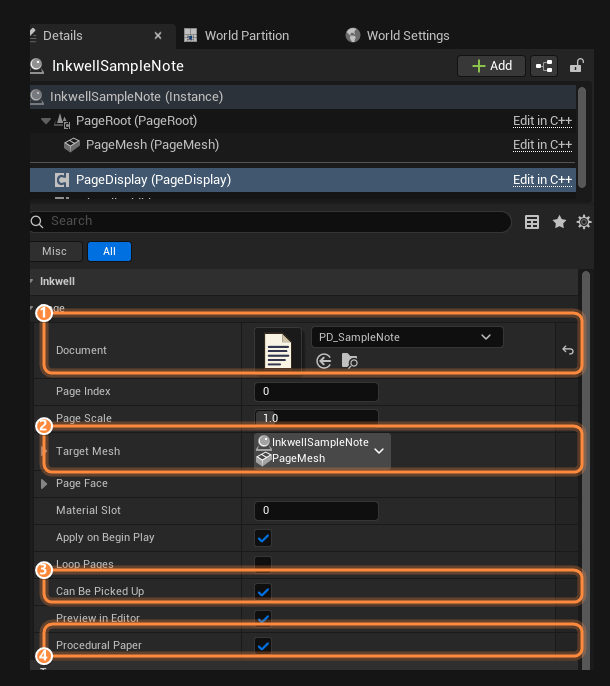
Set **Document** to a Page Document. If the actor already owns a mesh, the page appears
on it straight away in the viewport — no Play needed, because
[**Preview In Editor**](#editor-preview) is on by default. If the actor has no mesh, a
sheet of paper appears instead: see [Procedural Paper](#procedural-paper).
With one mesh on the actor there is nothing to do — skip this. With several, set
**Target Mesh** to the one the page belongs on; otherwise the component takes whichever
mesh comes first on the actor, which is rarely the one you meant. See
[how the mesh is chosen](#how-the-component-finds-a-mesh).
The page is applied to **Material Slot** `0` unless you change it. By default the face
it lands on must have clean 0–1 UVs across the whole page area — if the writing looks
stretched, smeared or cropped, this is why. For a mesh that was *not* unwrapped that
way — a face parked in the corner of an atlas, an unwrap that runs sideways — open
[**Page Face**](#page-face-custom-meshes) instead of re-unwrapping the mesh.
From your interaction code, call **Next Page** / **Previous Page** / **Set Page Index**
on the component. Bind **On Page Changed** to play a paper rustle or update a "3 / 12"
counter.
## Properties
| Property | Type | Default | What it does |
| ----------------------- | --------------------- | --------------- | ------------------------------------------------------------------------------------------------------------------------------------------------------------------------------------------------------------------------------------------------------------------------------------------------------------------------------------------------------------------------------------------------------------------------------------------- |
| **Document** | Ink Page Document | *None* | The authored page content to show. With none assigned the component applies a [blank sheet](#with-no-document) rather than leaving stale ink behind. |
| **Page Index** | Integer | `0` | The page currently shown, 0-based. Clamped into the document's range. |
| **Page Scale** | Float | `1.0` | Multiplies the document's own physical size for this component. `2` is twice as big, `0.5` half. Clamped at `0.01`; the slider runs `0.1`–`5.0`. See [Sizing](#sizing). |
| **Target Mesh** | Component reference | *None* | The mesh the page is drawn onto. Empty means "work it out", which is the right answer on an actor with one mesh — see [below](#how-the-component-finds-a-mesh). |
| **Page Face** | Ink Page Face Mapping | *Full UV Range* | Where on the target mesh's face the page lands. The default is the whole 0–1 UV square; open it only for a mesh that was not unwrapped for Inkwell. See [Page Face](#page-face-custom-meshes). |
| **Material Slot** | Integer | `0` | The material slot on the target mesh the page is applied to. |
| **Apply On Begin Play** | Boolean | `true` | Bake and apply the page when play starts, and broadcast **On Page Changed** once. Off, nothing is drawn until you call **Refresh** yourself. |
| **Loop Pages** | Boolean | `false` | Wrap from the last page to the first (and back) in **Next Page** / **Previous Page**. |
| **Can Be Picked Up** | Boolean | `true` | Whether the demo [Ink Page Interactor](/plugins/inkwell/components/interactor)'s look-at trace may focus this page and hold it up to read. Off, the page renders exactly the same but the trace treats it as scenery: no prompt, no pickup — for the poster glued to a wall, the sign over a shop. Read/write from Blueprint, so a page can be locked until a quest step. An interaction system of your own can read the flag the same way. |
| **Preview In Editor** | Boolean | `true` | Draw the page in the level viewport while editing, without pressing Play. |
| **Procedural Paper** | Boolean | `true` | Spawn a sheet of paper when the actor has no mesh of its own. See [Procedural Paper](#procedural-paper). |
## Functions
All of these are Blueprint-callable or Blueprint-pure, in the **Inkwell → Page** palette
category.
| Node | Returns | What it does |
| ------------------------------ | ------------------------- | ---------------------------------------------------------------------------------------------------------------------------------------------------------------------------------------------------------------------------- |
| **Set Document** | — | Swaps in a different document and shows the given page (defaults to `0`). Clamps the index, refreshes, and broadcasts **On Page Changed**. |
| **Set Page Index** | Boolean | Shows a specific page. Out-of-range values are clamped. Returns `true` only when the shown page actually changed, and only then refreshes and broadcasts. |
| **Next Page** | Boolean | Forward one page. Returns `false` on the last page, unless **Loop Pages** is on, in which case it wraps to page 0. |
| **Previous Page** | Boolean | Back one page. Returns `false` on the first page, unless **Loop Pages** is on, in which case it wraps to the last page. |
| **Refresh** | — | Re-does everything: fixes the paper, re-bakes the current page and re-applies the material. Call it after changing the document at runtime. Virtual — [Ink Page Stack](/plugins/inkwell/components/page-stack) overrides it. |
| **Get Page Count** | Integer | Pages in the current document; `0` when none is assigned. |
| **Get Current Page Index** | Integer | The page currently shown, 0-based. |
| **Is On First Page** | Boolean | True when **Page Index** is `0` or lower. Handy for graying out a "previous" prompt. |
| **Is On Last Page** | Boolean | True on the last page — and also when there is no document at all. |
| **Get Effective Page Size Cm** | 2D Vector | The size the paper is drawn at, in centimeters: the document's **Get Page Size Cm** × **Page Scale**. Returns A4 (21 × 29.7) × **Page Scale** when no document is assigned. |
| **Apply Page Size** | — | Re-applies the paper's *physical size* without re-baking any ink, and fires **On Page Size Changed** if the size really moved. The cheap path a **Page Scale** change takes. |
| **Resolve Target Mesh** | Mesh Component | The mesh this component is actually drawing onto, after the [resolution rules](#how-the-component-finds-a-mesh). |
| **Get Page Material** | Dynamic Material Instance | The material instance created for the current page, or None if the page has not been drawn yet. Use it to tweak ink and paper parameters yourself. |
| **Get Procedural Paper Mesh** | Static Mesh Component | The sheet spawned by [Procedural Paper](#procedural-paper), or None when the actor supplies its own mesh. |
**Next Page** and **Previous Page** both return `false` immediately when the document has
one page or fewer, so calling them straight from an input event is safe.
## Events
### On Page Changed
Fires whenever the shown page changes: a successful **Set Page Index**, a **Next Page** or
**Previous Page** that moved, a **Set Document** call, and the initial draw at Begin Play
when **Apply On Begin Play** is on.
| Parameter | Type | Meaning |
| ------------------ | ------- | ------------------------------ |
| **New Page Index** | Integer | The page now shown, 0-based. |
| **Page Count** | Integer | Pages in the current document. |
Use it for page-turn audio, a page counter, or driving quest state off "the player reached
the last page".
### On Page Size Changed
Fires when the paper's *physical* size changes — a **Page Scale** edit, a **Set Document**
bringing in a differently sized document, or the first time the size is applied.
| Parameter | Type | Meaning |
| --------------- | --------- | --------------------------------------------------- |
| **New Size Cm** | 2D Vector | The size the paper is now drawn at, in centimeters. |
It only fires on a real change: the component remembers the last size it announced, so a
**Refresh** that leaves the size alone is silent. Bind it to reposition whatever sits on or
around the page — a frame mesh, a pinned label, a collision volume. It is what the
[Ink Page](/plugins/inkwell/components/page-actor) actor uses to keep its own sheet fitted.
## How the component finds a mesh
The component draws onto exactly one mesh, chosen in this order:
1. **Target Mesh**, if the pick resolves to something that is a `MeshComponent` (static or
skeletal). Worth setting only when the actor carries several meshes — rule 2 covers the
ordinary one-mesh actor without you touching anything.
2. Otherwise **the actor's first mesh component**, in component order — *deliberately
skipping the sheet Procedural Paper spawned*. That exclusion matters: the spawned sheet
is itself a mesh component on the actor, so counting it would make the component conclude
the actor supplies its own paper and destroy the sheet on the next refresh.
3. Otherwise the [procedurally spawned sheet](#procedural-paper), if there is one.
4. Otherwise nothing is drawn. When a document is assigned, a Warning on `LogInkwell` names
the actor: *"has no mesh to draw onto - set Target Mesh, add a mesh component to the
actor, or enable Procedural Paper."*
A **Target Mesh** pick that resolves to something which is *not* a mesh — a scene component,
a stale reference — does not disable the component. It quietly falls through to rule 2 and
draws on the actor's first mesh instead. If the page turns up somewhere unexpected, check
that the pick is still valid.
**The Target Mesh dropdown only fills in on an actor placed in a level.** Opened inside the
Blueprint editor it comes up empty, and no pick can be made — Unreal's component picker
resolves candidates against an actor, and in the Components tab you are editing a component
*template*, which has no actor to search.
That is also why the **Component Property Name** field underneath becomes editable there:
the engine enables it precisely when the picker cannot resolve. It is the working path in a
Blueprint. Type the mesh component's **variable name** — `PageMesh`, not a display label —
and it resolves at runtime the same way a pick would.
**Resolve Target Mesh** returns whatever this resolved to, so you can check it from
Blueprint. **Get Page Material** returns the dynamic material instance the component made
for that mesh.
## Adding it to an actor you already have
Open the actor (Blueprint editor, or select a placed actor in the level), press
**Add Component**, and pick **Ink Page Display** — it is in the *Inkwell* class group.
It is an ordinary actor component and needs no C++.
Set **Document** to a Page Document. If the actor already owns a mesh, the page appears
on it straight away in the viewport — no Play needed, because
[**Preview In Editor**](#editor-preview) is on by default. If the actor has no mesh, a
sheet of paper appears instead: see [Procedural Paper](#procedural-paper).
With one mesh on the actor there is nothing to do — skip this. With several, set
**Target Mesh** to the one the page belongs on; otherwise the component takes whichever
mesh comes first on the actor, which is rarely the one you meant. See
[how the mesh is chosen](#how-the-component-finds-a-mesh).
The page is applied to **Material Slot** `0` unless you change it. By default the face
it lands on must have clean 0–1 UVs across the whole page area — if the writing looks
stretched, smeared or cropped, this is why. For a mesh that was *not* unwrapped that
way — a face parked in the corner of an atlas, an unwrap that runs sideways — open
[**Page Face**](#page-face-custom-meshes) instead of re-unwrapping the mesh.
From your interaction code, call **Next Page** / **Previous Page** / **Set Page Index**
on the component. Bind **On Page Changed** to play a paper rustle or update a "3 / 12"
counter.
## Properties
| Property | Type | Default | What it does |
| ----------------------- | --------------------- | --------------- | ------------------------------------------------------------------------------------------------------------------------------------------------------------------------------------------------------------------------------------------------------------------------------------------------------------------------------------------------------------------------------------------------------------------------------------------- |
| **Document** | Ink Page Document | *None* | The authored page content to show. With none assigned the component applies a [blank sheet](#with-no-document) rather than leaving stale ink behind. |
| **Page Index** | Integer | `0` | The page currently shown, 0-based. Clamped into the document's range. |
| **Page Scale** | Float | `1.0` | Multiplies the document's own physical size for this component. `2` is twice as big, `0.5` half. Clamped at `0.01`; the slider runs `0.1`–`5.0`. See [Sizing](#sizing). |
| **Target Mesh** | Component reference | *None* | The mesh the page is drawn onto. Empty means "work it out", which is the right answer on an actor with one mesh — see [below](#how-the-component-finds-a-mesh). |
| **Page Face** | Ink Page Face Mapping | *Full UV Range* | Where on the target mesh's face the page lands. The default is the whole 0–1 UV square; open it only for a mesh that was not unwrapped for Inkwell. See [Page Face](#page-face-custom-meshes). |
| **Material Slot** | Integer | `0` | The material slot on the target mesh the page is applied to. |
| **Apply On Begin Play** | Boolean | `true` | Bake and apply the page when play starts, and broadcast **On Page Changed** once. Off, nothing is drawn until you call **Refresh** yourself. |
| **Loop Pages** | Boolean | `false` | Wrap from the last page to the first (and back) in **Next Page** / **Previous Page**. |
| **Can Be Picked Up** | Boolean | `true` | Whether the demo [Ink Page Interactor](/plugins/inkwell/components/interactor)'s look-at trace may focus this page and hold it up to read. Off, the page renders exactly the same but the trace treats it as scenery: no prompt, no pickup — for the poster glued to a wall, the sign over a shop. Read/write from Blueprint, so a page can be locked until a quest step. An interaction system of your own can read the flag the same way. |
| **Preview In Editor** | Boolean | `true` | Draw the page in the level viewport while editing, without pressing Play. |
| **Procedural Paper** | Boolean | `true` | Spawn a sheet of paper when the actor has no mesh of its own. See [Procedural Paper](#procedural-paper). |
## Functions
All of these are Blueprint-callable or Blueprint-pure, in the **Inkwell → Page** palette
category.
| Node | Returns | What it does |
| ------------------------------ | ------------------------- | ---------------------------------------------------------------------------------------------------------------------------------------------------------------------------------------------------------------------------- |
| **Set Document** | — | Swaps in a different document and shows the given page (defaults to `0`). Clamps the index, refreshes, and broadcasts **On Page Changed**. |
| **Set Page Index** | Boolean | Shows a specific page. Out-of-range values are clamped. Returns `true` only when the shown page actually changed, and only then refreshes and broadcasts. |
| **Next Page** | Boolean | Forward one page. Returns `false` on the last page, unless **Loop Pages** is on, in which case it wraps to page 0. |
| **Previous Page** | Boolean | Back one page. Returns `false` on the first page, unless **Loop Pages** is on, in which case it wraps to the last page. |
| **Refresh** | — | Re-does everything: fixes the paper, re-bakes the current page and re-applies the material. Call it after changing the document at runtime. Virtual — [Ink Page Stack](/plugins/inkwell/components/page-stack) overrides it. |
| **Get Page Count** | Integer | Pages in the current document; `0` when none is assigned. |
| **Get Current Page Index** | Integer | The page currently shown, 0-based. |
| **Is On First Page** | Boolean | True when **Page Index** is `0` or lower. Handy for graying out a "previous" prompt. |
| **Is On Last Page** | Boolean | True on the last page — and also when there is no document at all. |
| **Get Effective Page Size Cm** | 2D Vector | The size the paper is drawn at, in centimeters: the document's **Get Page Size Cm** × **Page Scale**. Returns A4 (21 × 29.7) × **Page Scale** when no document is assigned. |
| **Apply Page Size** | — | Re-applies the paper's *physical size* without re-baking any ink, and fires **On Page Size Changed** if the size really moved. The cheap path a **Page Scale** change takes. |
| **Resolve Target Mesh** | Mesh Component | The mesh this component is actually drawing onto, after the [resolution rules](#how-the-component-finds-a-mesh). |
| **Get Page Material** | Dynamic Material Instance | The material instance created for the current page, or None if the page has not been drawn yet. Use it to tweak ink and paper parameters yourself. |
| **Get Procedural Paper Mesh** | Static Mesh Component | The sheet spawned by [Procedural Paper](#procedural-paper), or None when the actor supplies its own mesh. |
**Next Page** and **Previous Page** both return `false` immediately when the document has
one page or fewer, so calling them straight from an input event is safe.
## Events
### On Page Changed
Fires whenever the shown page changes: a successful **Set Page Index**, a **Next Page** or
**Previous Page** that moved, a **Set Document** call, and the initial draw at Begin Play
when **Apply On Begin Play** is on.
| Parameter | Type | Meaning |
| ------------------ | ------- | ------------------------------ |
| **New Page Index** | Integer | The page now shown, 0-based. |
| **Page Count** | Integer | Pages in the current document. |
Use it for page-turn audio, a page counter, or driving quest state off "the player reached
the last page".
### On Page Size Changed
Fires when the paper's *physical* size changes — a **Page Scale** edit, a **Set Document**
bringing in a differently sized document, or the first time the size is applied.
| Parameter | Type | Meaning |
| --------------- | --------- | --------------------------------------------------- |
| **New Size Cm** | 2D Vector | The size the paper is now drawn at, in centimeters. |
It only fires on a real change: the component remembers the last size it announced, so a
**Refresh** that leaves the size alone is silent. Bind it to reposition whatever sits on or
around the page — a frame mesh, a pinned label, a collision volume. It is what the
[Ink Page](/plugins/inkwell/components/page-actor) actor uses to keep its own sheet fitted.
## How the component finds a mesh
The component draws onto exactly one mesh, chosen in this order:
1. **Target Mesh**, if the pick resolves to something that is a `MeshComponent` (static or
skeletal). Worth setting only when the actor carries several meshes — rule 2 covers the
ordinary one-mesh actor without you touching anything.
2. Otherwise **the actor's first mesh component**, in component order — *deliberately
skipping the sheet Procedural Paper spawned*. That exclusion matters: the spawned sheet
is itself a mesh component on the actor, so counting it would make the component conclude
the actor supplies its own paper and destroy the sheet on the next refresh.
3. Otherwise the [procedurally spawned sheet](#procedural-paper), if there is one.
4. Otherwise nothing is drawn. When a document is assigned, a Warning on `LogInkwell` names
the actor: *"has no mesh to draw onto - set Target Mesh, add a mesh component to the
actor, or enable Procedural Paper."*
A **Target Mesh** pick that resolves to something which is *not* a mesh — a scene component,
a stale reference — does not disable the component. It quietly falls through to rule 2 and
draws on the actor's first mesh instead. If the page turns up somewhere unexpected, check
that the pick is still valid.
**The Target Mesh dropdown only fills in on an actor placed in a level.** Opened inside the
Blueprint editor it comes up empty, and no pick can be made — Unreal's component picker
resolves candidates against an actor, and in the Components tab you are editing a component
*template*, which has no actor to search.
That is also why the **Component Property Name** field underneath becomes editable there:
the engine enables it precisely when the picker cannot resolve. It is the working path in a
Blueprint. Type the mesh component's **variable name** — `PageMesh`, not a display label —
and it resolves at runtime the same way a pick would.
**Resolve Target Mesh** returns whatever this resolved to, so you can check it from
Blueprint. **Get Page Material** returns the dynamic material instance the component made
for that mesh.
Page Face — custom meshes
By default the page spans the target mesh's whole 0–1 UV square — the flat-sheet assumption
the bundled `SM_PageSheet` is built for, and the right answer for any mesh whose page face
was unwrapped to fill 0–1. **Page Face** (`FInkPageFaceMapping`) exists for the prop that
was *not* unwrapped that way: the sticky note whose face sits in a corner of an atlas, the
board whose UVs run sideways, the thick note whose back face should stay bare.
| Property | Type | Default | What it does |
| ------------------------------- | --------- | ------------------- | ----------------------------------------------------------------------------------------------------------------------------------------------------------------------------------------------------------------------------------------------------- |
| **Fit** | Enum | `Full UV Range` | How the page's rectangle is found within the face's UVs: **Full UV Range** (the whole 0–1 square), **Auto Fit** (the UV rectangle the mesh's face actually occupies, measured from the mesh), or **Custom Region** (the rectangle you type in below). |
| **Region Min** / **Region Max** | 2D Vector | `(0, 0)` / `(1, 1)` | The UV rectangle the page occupies. Auto Fit writes these from the mesh; Custom Region reads whatever you set. Ignored while Fit is Full UV Range. |
| **Rotation Quarter Turns** | Integer | `0` | Turns the page a quarter at a time (`0`–`3`) for the face whose unwrap runs sideways or upside down. Quarter turns rather than degrees on purpose: they cannot clip the page's corners against the region. |
| **Ink On Back Face** | Boolean | `true` | Whether back faces show the writing too. On a two-sided sheet the back face shares the front's UVs, so the text shows through mirrored — paper does that, so it stays on. Off, back faces show bare paper. |
The whole mapping folds into one affine UV transform costing the material two vector
parameters, so what it can express is exactly region plus quarter turns — not arbitrary
warps. The bend of a curved sheet comes from the mesh's own UVs, which is where it belongs:
the text follows the surface because the UVs do.
An Ink Page Document carries an editor-only **Preview Mesh** with its own preview face
mapping, so you can author against the real prop in the [Page Editor](/plugins/inkwell/authoring/page-editor)
and then copy the values onto the component's **Page Face** when the placed prop uses the
same mesh.
## Where the paper comes from
What the component actually applies depends on the document's **Paper Mode** — all four
modes are covered on the [paper page](/plugins/inkwell/authoring/paper):
* **Texture** and **Procedural**: the component creates a dynamic instance of the project's
page ink material and feeds it the baked ink plus the resolved paper texture — supplied or
generated.
* **Custom Material**: the document's **Paper Material** — your own graph, carrying the
`MF_InkwellPageInk` material function to receive the ink — replaces whatever the target
slot wore.
* **Mesh's Own Material**: no paper from Inkwell at all. The component makes a dynamic
instance of the material the slot *already* wears — per mesh instance, so per-instance
textures and parameter overrides survive — and writes only the ink parameters onto it.
The material must contain `MF_InkwellPageInk`; one without it shows no ink and raises no
error — that is the contract. Unlike Custom Material, nothing is replaced.
In Custom Material mode, a paper material without the configured ink texture parameter
(`InkTexture` by default) shows paper but no writing. Inkwell logs a one-time Warning on
`LogInkwell` naming the material and telling you to drop `MF_InkwellPageInk` into its
graph — check the Output Log if your custom paper stays blank.
## The back of the sheet
A page can carry [an authored back](/plugins/inkwell/authoring/layers) — its own layer stack for the other
side of the physical sheet — and the display component shows it without being asked:
* On the bundled `SM_PageSheet` (and any custom mesh that names a material slot **Back**),
the back slot is dressed with the back's ink and the document's back paper.
* On a mesh with no **Back** slot — a flat plane, a customer prop — the one page material
carries the back itself, shown on back faces only, sampled mirrored the way real
show-through reads.
* A back that was never authored bakes nothing and allocates nothing; what an unauthored
back *shows* is governed by **Page Face → Ink On Back Face**: the front's writing showing
through mirrored (on, the default — thin paper), or bare paper (off).
The display component always *shows* whichever side faces the viewer; actually turning a
sheet over in the player's hands is the [Ink Page Reader](/plugins/inkwell/components/reader)'s **Flip
Page**.
## Procedural Paper
When the actor has no mesh of its own, the component supplies the paper: it spawns a static
mesh sheet, attaches it to the actor's root component, and scales it from the document's own
size. Add the component to an empty actor, assign a document, and you have a readable sheet
of paper. That is the whole reason **Procedural Paper** is a single boolean and is on by
default.
The details worth knowing:
* The sheet uses the project's page sheet mesh from
[Project Settings → Plugins → Inkwell](/plugins/inkwell/reference/settings) (`/Inkwell/Meshes/SM_PageSheet`
by default — a 100 cm sheet, so document centimeters map straight to scale).
* It is scaled to [**Get Effective Page Size Cm**](#sizing) on every refresh, so editing the
document's **Page Width Cm** or dragging **Page Scale** resizes it live in the viewport.
* Its collision is set once, at spawn: **Query Only** (no physics collision at all), object
type World Dynamic, ignoring every channel except **Visibility**, which it blocks.
Overlap events are off and it never affects the navmesh. So the player walks straight
through it, the camera does not collide with it, AI sight and hitscan traces on project
channels pass through it — and a **Visibility** line trace (the demo interactor's default
**Trace Channel**) hits the page.
* With **no document assigned** you still get a sheet, sized A4 × **Page Scale**, showing
blank paper — so a freshly added component immediately shows what it is about to print on.
**The sheet blocks only the Visibility channel.** If your interaction system traces a
custom channel, the spawned sheet ignores it and your trace sails through the paper. The
collision responses are applied once, at spawn, precisely so you can change them: call
**Get Procedural Paper Mesh** and set your own channel response on the returned component —
the change sticks. (This also pairs with the demo interactor's **Trace Channel** property:
whatever channel is traced, the paper must answer it.)
**It never takes over a mesh you provided.** The sheet is a fallback, used only when
[mesh resolution](#how-the-component-finds-a-mesh) finds nothing on the actor. An explicit
**Target Mesh**, or any mesh component already on the actor, wins and no sheet is spawned —
so leaving the option on costs nothing on a prop, a book or the
[Ink Page](/plugins/inkwell/components/page-actor) actor. The moment the actor gains a mesh of its own, an
existing sheet is destroyed.
### When to turn it off
* The actor is meant to draw **nothing** until something else happens, and you do not want a
blank sheet floating there in the meantime.
* The page belongs on a mesh that is **not on this actor yet** — spawned later, or attached
at runtime — and you would rather see nothing than a stray sheet in the interim.
* You are managing paper yourself and want the component to be purely a page API.
Turning it off on an actor with no mesh means nothing is drawn at all, which is exactly what
the option is for.
The spawned sheet is **transient**: it is derived from the document, rebuilt on load, and
never saved into your level. Do not reference it from saved data or attach persistent things
to it, and treat **Get Procedural Paper Mesh** as a handle that is valid only until the sheet
is destroyed — which happens when the option is switched off, when the actor gains a mesh, or
when the component unregisters.
[Ink Page Stack](/plugins/inkwell/components/page-stack) always spawns one sheet per page, so this option
never applies there.
## Sizing
Physical size is a property of the *content*, not of the component:
```text theme={null}
Get Effective Page Size Cm = Document → Get Page Size Cm × Page Scale
```
The document's [**Page Width Cm**](/plugins/inkwell/authoring/documents) is the only physical dimension
anyone sets; its height is derived from the page's pixel aspect ratio, so the paper is always
the shape of the page you authored and writing can never come out stretched. **Page Scale**
multiplies **both** dimensions together, which preserves that guarantee — there is no second
size that could disagree with the first.
So a document authored 21 cm wide is A4 everywhere it appears, and a pocket note authored
9 cm wide is small everywhere — with **Page Scale** left at `1`. Set **Page Scale** to `2` on
one placement and that copy alone becomes a desk-sized ledger.
**Apply Page Size is what pushes the size onto the paper.** It re-fits the paper and fires
**On Page Size Changed**; it does not touch the ink, because resizing does not change a single
pixel of what is written. That is why it is safe to run on every tick of a slider drag, and
why editing **Page Scale** in the Details panel resizes the sheet live without ever re-baking
or turning a page.
Setting **Page Scale** from Blueprint does not apply itself. Call **Apply Page Size** after
it (or **Refresh**, which also re-bakes and is far more expensive).
**Inkwell only resizes paper it made.** On the spawned sheet, **Apply Page Size** rescales
the sheet directly; the [Ink Page](/plugins/inkwell/components/page-actor) actor re-fits its **Page Mesh**;
[Ink Page Stack](/plugins/inkwell/components/page-stack) re-deals the whole pile. When the page is drawn onto
a mesh **you** supplied, the component never touches your transform — it only changes the size
it *reports* and fires **On Page Size Changed**. Scaling the prop is yours to do, and that
event is the hook for doing it.
## Which material slot the ink lands in
The baked page is applied with `SetMaterial` on the resolved mesh, into **Material Slot**
(default `0`). In Texture and Procedural paper modes the component creates a dynamic
instance of the project's page ink material (`/Inkwell/Materials/MI_PageInk` by default,
repointable in [Project Settings](/plugins/inkwell/reference/settings)) and sets the ink texture, paper
texture, tints and ink strength on it; the [other paper modes](#where-the-paper-comes-from)
swap what the instance derives from. No other slot on the mesh is touched — with one
exception: a slot named **Back**, which is how [the sheet's underside](#the-back-of-the-sheet)
is dressed.
Set **Material Slot** when the page belongs on the second material of a multi-material prop:
a book cover mesh whose pages are slot 1, a clipboard whose paper is slot 2. The bundled
sheet's slots are **Front** (slot `0`), **Back** and **Edge**, so on the procedural sheet
leave it at `0`.
Grab the instance with **Get Page Material** if you want to drive material parameters
yourself — an ink fade-in, a wetness or burn parameter of your own. It is recreated on every
refresh, so read it again after one.
### With no document
The component does not leave stale ink in the slot. With **Document** unset it applies the
page material with the project's blank-ink texture and the paper texture switched off, so the
mesh shows plain paper. Assign a document later with **Set Document** and the page appears.
## Editor preview
With **Preview In Editor** on (the default), the page renders in the level viewport as you
edit: assign a document, scrub **Page Index**, drag **Page Scale**, and the mesh updates
without pressing Play. Editing the document in the [Page Editor](/plugins/inkwell/authoring/page-editor)
updates every placed page using it, immediately. Authored backs preview too, on the sheet's
**Back** slot.
* The preview is **cosmetic**. Neither the sheet nor the material assignment dirties the level
package, so opening a map full of pages never demands a save.
* It bakes into one reused transient render target per component (plus a second for a page
with an authored back), rather than allocating a new one per refresh.
* **A Page Scale edit takes the cheap path.** In the Details panel it calls
[**Apply Page Size**](#sizing) only — no re-bake — which is what lets the paper follow the
slider. Any other property edit triggers a full **Refresh**.
* During editor startup the Slate renderer can briefly be unavailable and the bake fails. The
component retries on the core ticker up to 8 times with an exponential backoff, from 0.25 s
to 32 s (about a minute in total). If it still cannot bake, it logs a Warning on
`LogInkwell` and the sheet refreshes the next time it is edited or the map is reopened.
* In game and PIE the preview path is not used. Pages bake through the per-world page cache,
which shares one bake between every display showing the same document page — see
[rendering](/plugins/inkwell/reference/rendering).
Check the Output Log first: every misconfiguration this component can detect logs a Warning
on **LogInkwell**. Then work down this list:
* **No mesh.** The Warning reads `has no mesh to draw onto`. Set **Target Mesh**, add a
mesh, or leave **Procedural Paper** on.
* **Procedural Paper on, but no sheet.** The actor needs a **root component** for the sheet
to attach to; an actor with no scene root gets its own Warning saying so.
* **Preview In Editor off.** Nothing draws outside of play. Turn it on, or press Play.
* **Apply On Begin Play off.** In game, nothing is drawn until you call **Refresh** yourself.
* **Wrong material slot.** The ink went into a slot you cannot see. Try `0`.
* **Custom paper material shows no writing.** The material lacks the ink texture parameter —
the `LogInkwell` Warning names it. Drop `MF_InkwellPageInk` into the graph.
* **Editor just started.** Give it the retry window, or touch any property to force a refresh.
## Next
A physical pile of sheets with animated page turns — a drop-in replacement for this.
The ready-made placeable sheet built around this component.
Driving this page API from an interaction system you already have.
The four paper modes and what each one means for the material on your mesh.
UVs, material slots, and export settings that make a custom mesh take ink cleanly.